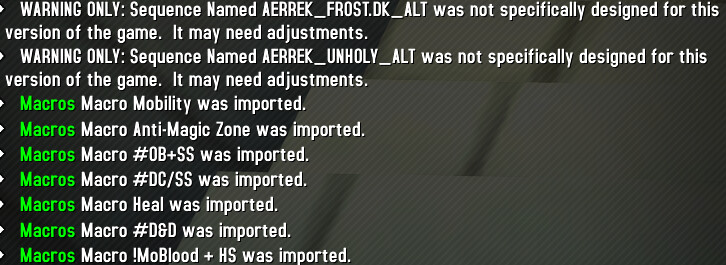
im still getting it
1 Like
Hmm that’s odd, both of those sequences are Death and Decay, on ALT, with macro. 
I swapped over but I’m not getting this error or either Frost or Unholy.
I updated my GSE and reupload, I noticed some GSE changes, maybe that can help fix it
Still nothing, ill do a clean setup again and see
Clean install didnt do it, but i managed to import the rest after deleteing all the character’s macros first
1 Like
@aerrek, this is fantastic. Great work. Working fine.
One question, how would i change the d & d macro to always cast on top of me vs at the cursor?
Find the !D&D, @D&D, and #D&D macros (/macro) and replace [@cursor] with [@player].
Not that you’ll lose range with @player and can no longer precast at the enemies you’re approaching.
Also, the WA will still show D&D on your mouse
What ever works for you 
1 Like
Thank youi! really appreciate it
1 Like
Thanks ill update it and try it, i did fix it myself by removing the death grip element as i think it was trying to do that on my mouseover target instead of casting Death Strike.
@Kamikaze1986, right, the ‘mouseover no casting’,
This happens on many specs, I tend to avoid putting mouseover abilities on shift because it’s used so frequently. Through gameplay I found that I was using Grip (basically) on CD. Maybe I’ll change it back

so when i import it confirms the import in chat message but it doesn’t show up in gse sequences
Double check these settings:
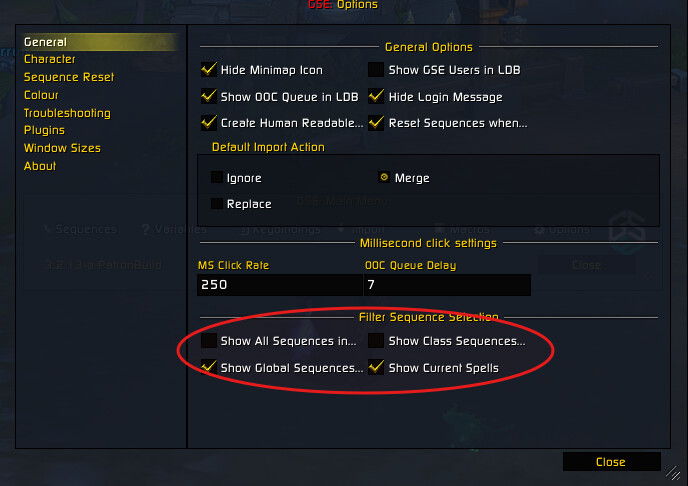
I reuploaded GSE just in case
1 Like
I think a few macros are missing from the latest version of the ‘wago’ link.
For example, there seems to be no “!DRW+TS+BS” macro.
the update that showed up on curse today seemed to have fixed the problem
Hey @Gi_Renong,
I reuploaded the GSE sequences but if the issue persists you can go ahead and manually create that /macro under character specific macros:
Macro Name:
!DRW+TS+BS
Macro:
#showtooltip
/castsequence [combat,nochanneling]reset=combat Dancing Rune Weapon, Tombstone, Blood Boil, Heart Strike, Bonestorm
Thanks for your awesome work!
I have one question: I have the Activation Button on Autoclick, does this also work with modifiers?
It looks like I still have to press Shift, Alt and Ctrl all the time and can’t hold it down.
So if WA shows me that Shift has to be held down, I still have to press it several times to execute the actions
You Activation Button should work with the modifiers, if you’re configured properly.
If you feel like you’re pressing the abilities several times it may be that you need to hold it until the GCD is ready.
If WA says SHIFT hold Shift until the ‘button’ goes away. Some specs might have you “HOLD SHIFT”, then hold Shift as long as you are being prompted to
Hello, Is it possible to assign a version number within the gse comments to know if I am up to date?
Hey @Mulkh_1812,
That is a possibility. I used to to that. Across 20+ specs it becomes too cumbersome (I forget), that’s the truth of it lol. Currently I have it setup to where I don’t even need to be on WLM to update any spec on any class, saves me a ton of time (A TON). Every ‘also do this’ across my 20+ specs just adds up fast.
So you know, you can find the Version # on the GSE Import page on Wago itself.
The way I imagine users to see updates is to use the Wago companion app. If you see you have an update for the WA, 85% of the time there is an update for the GSE sequences.
I’ve been trying to remember to add to the comments if and when the bigger updates happen, maybe with some notes too
2 Likes
When i add the WA whenever im in a party i get “Focus an ally worth protecting” and it doesnt go away. any ideas?
Have the same thing with the warrior WA.