Im on it! Do you happen to get any BugSack errors? Or any other information?
If you could file a Bug Report on Discord, that would be awesome!
Hello,
Sorry i did not check the BugSack Error. I will post a report on discord when i encounter it again with more information including BugSack error.
Thank you!
Upgrade to 2.1.1 and let me know if its fixed pls <3
 GRIP - Enhanced Macro Sequencer v2.1.2 – Imports That Actually Import
 Tagged <t:1778941921:R> · 11 commits since v2.1.1
Yeah, about that.
 The big one. Every native EMS export since v2.1.0 used the new
 !EMS1! prefix, but the import dispatcher was still looking for the old !GRIP1! prefix. So if you’ve been trying to share sequences with another v2.1.0+ user and getting “Unknown format” toasts like you tried to type with your elbows – that’s why. Three dispatch sites updated, both prefixes now route through the same path. Working as intended.
 Pershizzle’s bug. Imports of sequences that used numeric spell IDs (the base ones that talents override) resolved to the BASE spell, not the talented version. BM hunters were getting
 /cast Steady Shot where they wanted Barbed Shot. Cobra Shot was coming out as Arcane Shot. Imports now run the spell ID through FindSpellOverrideByID first, so the talent-active variant is what lands in the macro. Big thanks to Pershizzle for the catch.
 Discord label sweep. The Support panel was telling everyone the Discord was at
 discord.gg/grip-ems (which doesn’t exist), even though clicking the button correctly opened discord.gg/temptingus. Eleven locale files now match the button’s destination. If you wondered why the link looked wrong: that.
 CVar Manager housekeeping (5 commits). Pinned a CVar mid-throttle and watched it get reset anyway? Not anymore. Got a “Fixed 12 CVars” toast when only 8 actually changed? Not anymore. Per-row Fix in combat silently corrupting the “previous value” cache? Not anymore. Plus a defensive
 C_Timer guard on both throttle tickers because future-me will thank present-me when Blizzard renames the API for no reason.
 Get it: CurseForge · Wago · WoWInterface
Thank you for the quick fix. havent encountered the error since. Great job!
I hope you continue updating and improving this.
1 Like
v2.1.5 just shipped. Six fixes, all driven by real-world telemetry.
Hero-talent override spells
Soul Immolation, Eradicate, and other talented override variants no longer trigger the orange “needs attention” warning when used in sequences. The spell cache now registers each active override variant under its own name, and the validator stops counting known-but-not-in-spellbook spells as stale. Override re-translation also runs on every spell cache refresh now, not only on locale change – sequences that imported under one talent loadout and got reloaded under another kept stale names baked in until a locale flip or talent swap kicked things over. That gap is closed.
Mythic Plus /reload no longer breaks keybinds
A /reload mid-key used to leave sequences unbound for the rest of the run. The bootstrap keybind load got silently skipped under the addon-restriction lockdown that M+ keeps active for the whole key, and there was no retry path. Bootstrap now queues that load through the out-of-combat queue so it fires automatically when the lockdown lifts.
Smaller fixes
Opening EMS during combat or inside an M+ no longer throws ADDON_ACTION_BLOCKED. Garbage spell IDs (like {spell:3238019941}) typed into the macrotext editor or imported from corrupt payloads are rejected at the tagging step instead of crashing downstream.
Hi Sataana,
I’ve been trying to understand GRIP-EMS in more detail and I’m a bit confused about how some of the timing features work internally.
The tooltip for “Auto-adjust click rate per sequence” says:
“Click rate adjusts for each sequence when you activate it.”
I’m not fully sure how to interpret that and I’d like to understand what actually happens behind the scenes.
My current understanding (which could be completely wrong) is:
-
OOC Queue Delay may be related to queued actions/updates outside combat.
-
The automatic value (for example “Auto: 16 ms”) might be a learned or calculated timing value for a specific sequence.
-
Per-Character Click Rate might be a character-specific override.
-
Auto-adjust click rate per sequence might automatically apply sequence-specific timing values.
Could you explain how this actually works internally?
Some specific questions:
-
When “Auto-adjust click rate per sequence” is enabled, what exactly changes when a sequence becomes active?
-
Does GRIP-EMS actively apply those timing values itself, or only calculate/store/recommend them?
-
If a sequence already has an automatically learned value (for example 16 ms), how does that interact with Per-Character Click Rate?
-
Which setting has priority if multiple values exist (global, automatic, character-specific, etc.)?
-
I saw information mentioning that learning happens after around 30 samples/uses. Is that learning process:
-
separate for each sequence?
-
per character?
-
or shared globally?
-
-
Are learned values stored permanently between sessions or rebuilt over time?
-
Is the learning based on recent usage only, or does it continuously adapt over time?
I’m mostly interested in understanding the logic and architecture behind it.
Thanks 
1 Like
Hey, there are actually FOUR places where a click-rate number shows up in the UI and they do different things. (All of this is current as of GRIP-EMS v2.1.5; mechanics could change in later versions.)
THE FOUR PANELS YOU ARE SEEING
A) General > Click Rate (ms) – range 100-1000, default 250
This is your base / global default. It is the value used when nothing else overrides it. Heads-up: the auto-adjust system (panel C) writes to this same setting under the hood, so the slider value you see here can change without you touching it (more on that under Q1).
B) General > Per-Character Click Rate (ms) – range 0-1000, step 10, default 0
Per-character manual override. 0 means “ignore, use the global one.” Any non-zero value wins over the global. Note the slider step is 10, so the values you can land on are 0, 10, 20, 30, … up to 1000.
C) Faster, Slower > Auto-adjust click rate per sequence – checkbox, ON by default
This is the TempoAdvisor system. When it is on, EMS analyzes whichever sequence becomes active, computes a per-sequence recommended click rate, and writes that into the live click rate setting. When it is off, EMS still analyzes and stores the value but does not apply it. Worth knowing: since this defaults to ON, most users have had it running the whole time without explicitly turning it on.
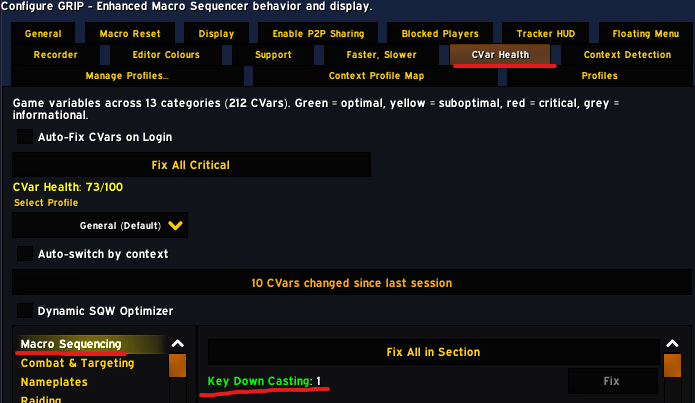
D) CVar Health > Dynamic SQW Optimizer > Recommended click rate
This is a SEPARATE system. The SQW Optimizer actively tunes the SpellQueueWindow CVar based on smoothed latency. As a side effect, it shows what click rate would best pair with the current GCD / SQW / latency math. This value is DISPLAY ONLY – it is never written to your click rate. The “Your setting: ##ms (##ms faster than the recommendation)” line is the panel comparing your live click rate (which after priority resolves to the Per-Character ##ms in B) against its own GCD-based recommendation. It is an advisory warning, not an enforced ceiling.
So the only two surfaces that actually WRITE your live click rate are: TempoAdvisor (C) and the two sliders in (A) and (B). The SQW Optimizer panel just compares and warns.
PRIORITY ORDER AT RUNTIME
When something asks for the effective click rate, EMS checks in this order and returns the first hit:
1. TempoAdvisor recommendation for the currently active sequence (only if "Auto-adjust" is on and the active sequence has a recommendation).
2. Per-Character Click Rate override (only if non-zero).
3. Profile default (the main Click Rate slider).
The SQW Optimizer never enters this chain.
There is one extra layer: per-sequence manual override. If you have explicitly set a click rate for a specific sequence (saved in a manual-override table), TempoAdvisor SKIPS that sequence and leaves your value in place.
YOUR SPECIFIC QUESTIONS
- When “Auto-adjust click rate per sequence” is enabled, what exactly changes when a sequence becomes active?
Two things:
- If there is no fresh analysis (or the last one is over 60s old), EMS walks every step of the sequence, classifies each spell (off-GCD, on-GCD instant, on-GCD cast, long cast, channeled, pause), reads your current latency and SpellQueueWindow, and computes the minimum click interval that keeps every step landing inside its window. That value is stored as the sequence’s recommendedMs.
- If “Auto-adjust” is on AND you have not set a manual override for this specific sequence, EMS writes that value into the main Click Rate setting (msClickRate). If you are in combat at the time, the write is parked in the OOC queue and applied the moment combat ends.
Side effect worth knowing: that second step writes to the SAME setting as your main Click Rate slider on the General tab. So if you open General after activating a sequence with auto-adjust on, the slider will show the per-sequence recommendation, not whatever you originally set. Switching to another sequence overwrites it again with that sequence’s value. The Per-Character override slider (B) is unaffected and keeps whatever you put in it.
- Does GRIP-EMS actively apply those timing values itself, or only calculate/store/recommend them?
Both, but only when the toggle is on. The analysis always runs and the value is always stored (so the UI can show it and the next activation has it cached). It only APPLIES to your live click rate when “Auto-adjust” is on. With it off, the recommendation is visible but your click rate stays at whatever the General sliders give you.
- If a sequence already has an automatically learned value, how does that interact with Per-Character Click Rate?
Same priority chain. TempoAdvisor recommendation > Per-Character override > Profile default. So if auto-adjust is on and you have an active sequence with a recommendation, the Per-Character value is ignored. The Per-Character override only kicks in when auto-adjust is off, OR no sequence is active, OR the active sequence has no recommendation yet.
About the “16 ms” you mentioned: the Per-Character Click Rate slider has step 10, so it can only land on 0, 10, 20, 30, … – 16 isn’t directly settable from that slider. If you are seeing “16” specifically on some other screen (a tempo overlay, the CPS sparkline, a /gems status print), tell me which screen and I will track down exactly what is displaying it. One thing worth noting: that slider has no 100ms floor the way the main Click Rate slider does (main is 100-1000, per-character is 0-1000). Whether 10ms is actually useful in practice is an empirical question I cannot answer without testing – if input frames are missed at that rate, you would feel it in casts not landing rather than as an error.
- Which setting has priority?
Same order as Q3. TempoAdvisor auto > Per-Character > Profile default. Per-sequence manual override sits on top of TempoAdvisor (it makes TA skip that sequence).
- Is the learning separate for each sequence, per character, or shared globally?
All three layers:
- Per character (stored in your character’s SavedVariables file, GRIP_EMS_CHAR)
- Per spec (BM Hunter, MM Hunter, etc. each get separate entries because talents and rotation differ)
- Per sequence name
So sequence “Foo” on your BM Hunter accumulates samples completely separately from sequence “Foo” on your MM Hunter, and separately from sequence “Bar” on the same BM Hunter.
What the 30-sample threshold does: below 30 samples, EMS uses the pure theoretical value (from spell classification + GCD + latency) and labels confidence “Estimated”. At 30+ samples it switches to a blend of 70% theoretical + 30% empirical (your actual measured CPS, scaled up by 20% headroom). Confidence becomes “Calibrated”.
- Are learned values stored permanently between sessions, or rebuilt over time?
Stored permanently in your character’s SavedVariables (GRIP_EMS_CHAR). Survives /reload, logout, and patches. They only disappear if the SavedVariables file is wiped, the sequence is deleted, or that character is reset.
The theoretical component gets recomputed when the spell cache rebuilds (spec change, talent change, login). The empirical component keeps adapting from your live play.
- Recent usage only, or continuous adaptation?
Both, in layers:
- The empirical RATE is always derived from a rolling 10-second window of actual button presses and spell casts. It reacts to what you are doing right now, not your whole history.
- The CONFIDENCE (Estimated vs Calibrated) is based on lifetime sample count for that sequence on that spec on that character. Once a sequence is over 30 samples it stays Calibrated (no decay).
- If you stop playing the sequence for more than 10 seconds, the empirical data goes stale and EMS falls back to the pure theoretical value until you start using it again.
When the newly blended value differs from the current one by more than 20%, EMS treats that as significant, updates the stored recommendation, and (with auto-adjust on) writes the new value into your live click rate.
BONUS: OOC QUEUE DELAY
Completely unrelated to click rate. The OOC queue is where EMS parks operations that cannot run during combat lockdown (sequence activation, CVar writes, certain keybind changes). The “Delay” setting (1-60s, default 7s) is just how often the fallback ticker checks the queue. Combat ending drains the queue immediately. The ticker is a safety net for cases where the combat-end event was missed.
Hope that maps the whole panel set for you. Yell if anything is still fuzzy, and tell me which screen the “16” is on if you are seeing that specifically.
anyone has not firing issue? i set my keybind and msg pop it has been assigned but nothing fired

omg, so stupid me, i was using gse while brain dead and never thought about this…thx!!!
Its all good. This comes up so often that I really should think about in game warning or prompt or something.
I start to love this addon, much responsive then other, is there community discord for the addon? link above seems gone now
v2.1.7 just shipped.
A grab bag of fixes from real-world reports over the past week.
The btn:Execute BugSack stack at login is gone. Old SavedVariables could hold {spell:N} tokens with N values past signed-32-bit; the spell cache now scrubs those at read time so the restricted env never sees the bad value. SavedVariables stay intact. Pershizzle and Hydra reported related failures during the v2.1.5 / v2.1.6 window.
The “Unrecognized spell(s) after rescan” chat warning at login is much quieter. Dormant cross-class sequences (a saved DH sequence on a Hunter, etc.) no longer flag, and same-class different-hero-spec spells like Black Arrow on a Pack Leader Hunter loadout are now silently treated as legitimate. Hydra’s Soul Immolation Felscarred convergence case is the canonical fix on the override timing race.
The Add menu in the Steps tab now disables every option (Step, Action with Interleave, Macro, Loop, Pause, If, Embed) at max nesting depth, not just the container options. The initial v2.1.7 ship gated only Loop/If/Embed on the assumption leaf adds were safe; the compiler drops any node past depth 10 regardless. Slowdog reported the symptom on Discord.
The macro health-score badge now matches the Repair tab and the validation triangle. A green triangle guarantees a 100 badge. A clean Repair guarantees a clean badge.
SpellPicker EditBox keyboard input is more reliable. Reopening the picker with the same query used to drop focus silently; focus restoration on Show, post-Show :SetFocus(), and defensive input handling now layer together.
The Per-Character Click Rate slider shows a sub-100ms warning when the value is below the human/hardware floor. The slider stays unclamped: 0 still means “use global”, sub-100 values are still accepted as the escape hatch.