💠 AutoSpec: Homepage
🚀 Getting Started with AutoSpec
🚀 AutoSpec: Getting Started
Your essential setup guide: install addons, configure your mouse, bind modifier keys, and import GSE sequences and WeakAuras.
Getting Started Video!
📈 What Sets AutoSpec Apart
AutoSpec Is Not Just Another Damage Macro
AutoSpec is a complete replacement for Blizzard’s standard combat experience, built from the ground up. Where most WLM posts offer basic GSE sequences focused only on damage, AutoSpec handles all your class and specialization abilities with custom sequences, a fully integrated WeakAura user interface, and real-time detection triggers for every situation.
Next-Level Optimization
Instead of leaving you with a static macro and no dynamic feedback, AutoSpec uses responsive triggers and custom HUD elements to provide clear, on-screen guidance exactly when you need it.
It replaces the standard UI and rotation guesswork with an adaptive combat engine—offering a smarter, cleaner, and more interactive way to play. Every detail, from dynamic automation logic to in-game prompts and event-based triggers, is hand-built and maintained with a game developer’s mindset.
🔍 Preview & Guide
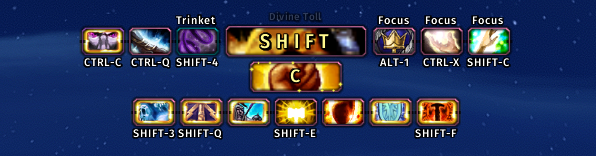
⏹️ Center Stack
Your go-to layer for critical combat info, ordered by priority:
- Priority Alerts
Major defensives or emergency heals that block out everything else.- Core Abilities
Your primary offensive abilities and logic, shown when no alerts are active.- Progress Bars
Key buff timers, cooldowns, and movement effects, displaying only the highest‐priority bar at once.⬇️ Action Button
Shows you exactly when to use interrupts and key offensive cooldowns that aren’t part of your main attack sequence.
Includes:
- Rotational CDs: Major offensive or defensive cooldowns outside your core cast rotation
- Interrupts & One-Offs: Spells like Kick, Purge, etc., prompted as soon as they’re expected to be used
Icons appear only when the ability is off cooldown and contextually appropriate, complete with your keybind overlay.
⬅️ Global Utility HUD (🚫 Unreleased)
Common abilities that every player should have at hand—no spec filtering.
Includes:
- Combat Resurrections: Rebirth, Soulstone, Redemption
- Out-of-Combat Resurrects: Revive, Ancestral Spirit, etc.
- Class-Wide Toggles & Auras: Paladin Auras, Shaman Totems, Warrior Shouts
- Persistent Racial Effects: All passive racials or toggled racials
Icons are loaded at login and never hidden—this HUD is a static toolbox for universal mechanics.
➡️ Conditional Utility HUD (🚫 Unreleased)
Surface support spells only when their explicit use conditions are met—if you see it, press it.
Includes:
- Cleanses/Dispels: Magic, Poison, Disease removal
- Ally-Targeted Saves: Focus-cast barriers, shields, emergency heals
- Conditional CC: Imprison, Sap, Psionic Trap (based on enemy type or status)
Abilities are hidden by default and appears when its trigger logic fires, and may glow when ugent (e.g., dispel-worthy debuff detected).
↔️ Situational Utility HUD (🚫 Unreleased)
Reactive/tactical crowd-control and niche utilities for enemy-facing scenarios—your “catch all" CC deck.
Includes:
- Interrupts: Kick, Counterspell, Pummel
- Soft CC & Displacements: Cyclone, Typhoon, Scatter, Gouge
- AoE Control: Ring of Frost, Fear, Freezing Trap
- Other Situational Utilities: Abilities that don’t fit the above categories but are used reactively
Icons show on cooldown readiness; glow or highlight when the situational conditions (enemy casting, proximity, etc.) are met.
HUD shown expanded for reference—actual gameplay uses a smaller, minimalist display.
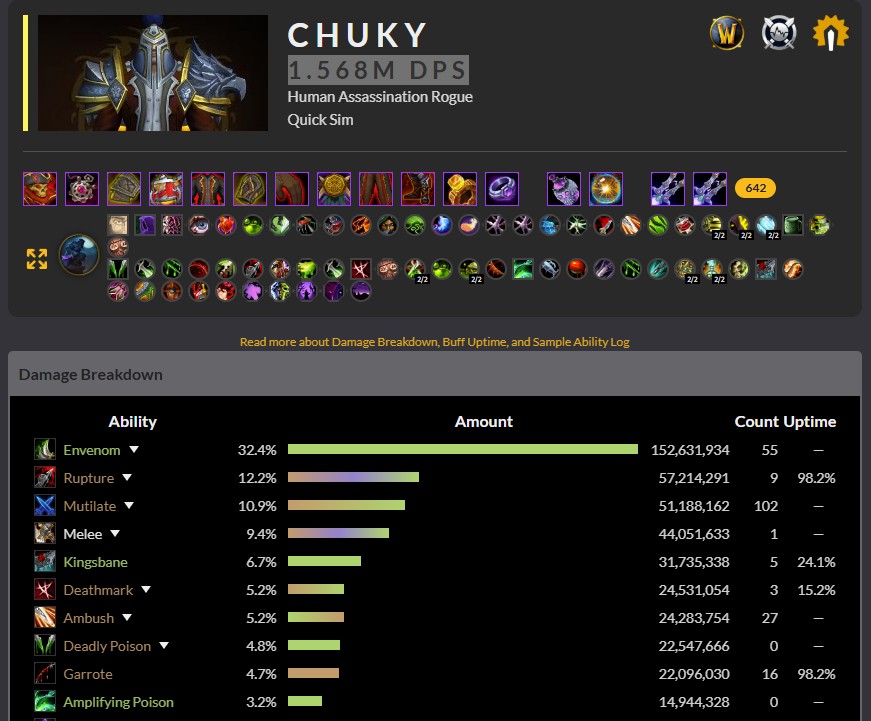
Assassination: No mercy. Just toxins and timing.
📝 Specialization Notes
⚙️ Ability Usage & Features
Description
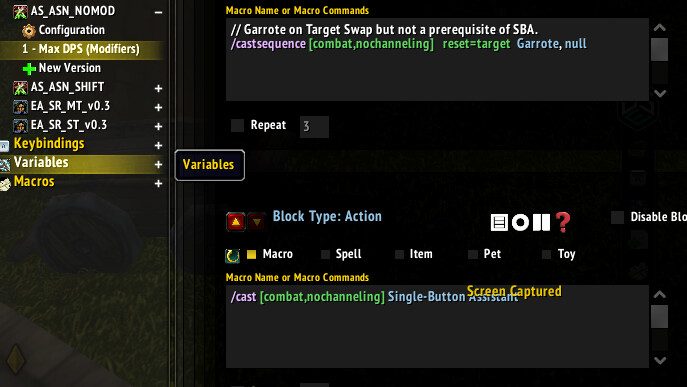
Single Button Assistant SBA performs well for Assassination. Theis build reduce reliance on it by handling as many ability’s as possible to avoid GCD penalties. The SBA’s main weakness—target swapping—is addressed by the nameplate system, which highlights targets missing key DoTs. Your Job: Target Swapping Assassination requires frequent swaps to maintain full DoT coverage. This isn’t a passive spec—you’ll need to monitor missing debuffs via the nameplate icons and swap targets to apply what’s missing. Kingsbane SBA reliably detects when a target will live long enough and applies Shiv. The trigger piggybacks on Shiv application. 🖥️ Nameplates
Crimson Tempest This icon appears when an AoE situation is detected and the target is missing the debuff. Garrote Displayed on enemy nameplates until three instances of the debuff are active, its practical limit. Rupture Shown when the debuff is missing and fewer than three enemies currently have it applied. Note: Only one debuff icon is shown per enemy nameplate. The icon represents the highest-priority DoT that is currently missing, based on combat context and active debuff limits. You are expected to target that enemy and let the single-button assistant handle application automatically.
‼️ To see what specific conditions prompt a WeakAura cast, search for the ability name in /wa and navigate to its "Trigger" tab inside the aura.📥 Imports & Builds
AutoSpec: WeakAura
🧬 Approved Talent Builds
Approved talent builds are included in the ‘Talents’ panel of the
..._NOMODGSE sequence. Each specialization provides, at least, an AoE and single-target PvE build.
- Builds are based on top PvE/PvP guides and tailored to AutoSpec’s logic.
- You may use other builds, but stability is only guaranteed with included imports.
- Build requests for PvP or leveling are always welcome when based on trusted, reputable guides to ensure smooth integration with existing builds.
ℹ️ About /macro Imports
Importing the GSE sequences adds a set of standalone macros to your
/macropanel. These one-off tools are not part of the rotation but assist with targeting and utility. Examples include stance switching, context-sensitive casts, and focus or mouseover support.🕹️ Controls & Keybindings
🔄 AutoSpec Controls
The WeakAura is built to make ability usage and gameplay as intuitive as possible.
General behavior across all AutoSpec systems:
- When no modifier is pressed, you’re running the
...NOMODsequence, which handles your core damage or healing rotation.- The
...NOMODsequence will auto-target enemies, but it will not start combat until you press Shift.- The
...SHIFTsequence doubles as the initiate combat button while out of combat. It’s intentionally required to begin pulling, acting as a safeguard to prevent accidental engagement.
When a modifier is needed, you’ll get a clear on-screen prompt or alert.
If the ability requires mouseover or cursor targeting, it will attach to your cursor and display the required modifier if applicable.Just follow the in-game prompts—no memorization required!
⌨️ Keybinding Detection
AutoSpec automatically scans your action bars on login or when you use
/reloadto detect and display your current keybinds.If you move abilities after this scan, the display will not update until you reload your UI again.
To disable keybind text, remove
%cfrom theText 1field on theDisplaytab of the relevant WeakAura. Do not delete the field entirely.
Druids & Warriors:
- Use identical keybinds across all combat stances/forms.
- Avoid placing combat abilities on Travel Form bars (Druids).

Resources & Support
📚 Quick Answers & FAQ
🔻 What key should I bind for the macro?
Bind a mouse button to
Numpad +using your mouse software (Razer Synapse, Logitech G Hub, etc). Avoid binding to1,Q, or function keys.🔻 Why is nothing firing when I hold the button?
Check the following:
- Continuous input is enabled (50ms)
- All four GSE sequences are bound to
Numpad +- No conflicting keybinds
- You’re holding the button, not tapping it
🔻 Why won’t modifier prompts go away?
Make sure your mouse sends continuous
Numpad +while holding the button and pressing modifiers. Double-check there are no in-game modifier keybinds and that the WeakAura is imported.🔻 Why do I need repeat functionality?
GSE macros need steady, repeated input. Set your mouse to turbo/continuous on
Numpad +(suggested: 50ms).🔻 Where do I find talent builds?
Talent builds are included in the
NOMODGSE sequence’sConfigurationpanel. Some spec pages also link recommended builds.🔻 How do I update specializations?
Re-import the latest strings from the WLM spec page. Use the Wago Companion app to stay synced.
🔻 Do I still need WeakAuras with GSE?
Yes. GSE handles macros; WeakAura manages HUD, prompts, and tracking.
🔻 Why don’t I see movement abilities or cooldowns?
AutoSpec does not automate movement abilities or long cooldowns. Use those manually or as prompted.
🔻 Can this get me banned?
No. AutoSpec only uses Blizzard-approved addons—no bots or API manipulation.
🛠️ Get Help / Report an Issue
Bug Reports & Support
For help or to report a bug, reply in this thread on WoW Lazy Macros, join the in-game
AutoSpeccommunity, or look out for the Discord (coming soon).
What to Include
- Spec & build
- Using
AutoSpec+?
- Input setup (mouse config, GSE version, etc.)
- Steps to reproduce the issue
- Expected vs. actual behavior
- Error messages, skipped spells, or weird behavior
- Screenshots (optional, but help a lot)
The more detail provided, the faster your issue can be addressed!
⭐ Support: Thank you!
This passion project takes a tremendous amount of time and energy to keep running smoothly for the entire community.
If AutoSpec has saved you time, reduced frustration, or enhanced your WoW experience, please consider supporting ongoing development using the links below:
Thank you in advance,
— Aerrek
Support on Ko-Fi! ☜( ゚ヮ゚)☞


 You said you were going to do Rogue next.. And I just saw this pop up.. cant wait to try.. ill share feedback (p.s What is SBA?)