Starting my tank journey now. Hoping to get KSH with this. Keep you updated!
hey aerrek can you update talents in your gse mods please thanks
Havoc Demon Hunter Is Back in AutoSpec
Havoc is back in the AutoSpec system—fully rebuilt, up to date, and taking full advantage of the latest AutoSpec logic.
AutoSpec is my one-button, modifier-driven system that handles your entire rotation, including smart cooldowns, AoE/ST detection, and built-in range logic. Just hold your mapped key, watch for prompts, and let the system take care of the rest.
What’s new for Havoc:
- Completely redesigned for current patch (11.1.5)
- Smarter cooldown handling (Metamorphosis, Essence Break, Eye Beam, etc.)
- CTRL modifier triggers Eye Beam and both Damage Sigils at your feet
- Prompts only show when abilities will actually hit (in range)
- Minimal, optimized UI—no clutter
Try it out. If you want Havoc to be brain-dead simple but never weak, this is for you.
Let me know what you think or if something’s not working—I’m always improving the system.
1 Like
Excited to try this out! I am not seeing the Havoc Talents listed in the NOMOD version, or any version actually. I only see them for the Veng sequence.
I imported the sequences and keybound them with the modifier keys. It seems like the CNTRL modifier isn’t working properly? Shift and Alt cause the prompt to go away, but I see two CNTRL prompts that appear and it will go between them at times, but it doesn’t seem to go away when holding CNTRL or tapping it either.
CTRL for Havoc controls 3 differnet actions.


Therefore, you might need to hold the CTRL key a bit longer than others at the start of combat (tapping just switches from NOMOD to CTRL—not what we want).
If you are not seeing these abilities being cast at all or the modifier is not going away, confirm that GSE is actually calling upon that sequence with this:
Troubleshooter:
Thank you for your timely reply! I figured it out, I had unknowingly bound the CNTRL to the ALT keybind sequence. It is functioning as intended! Thank you 
1 Like
Hi,
I got the talents as directed for the vengence sequence. but under havoc, nomod. there are no talents..
plz assist
Hey @Chuky,
Thanks for letting me know—the GSE import has been updated.
2 Likes
your macro have some problems bro. its not working. Also you dont need create 5 different macros for all. You can include the Alt shift cntrl modifiers in one macro if you know how.
1 Like
Hey @Ves_Minev,
Not sure how to troubleshoot that but I’ll give it a go…
If by “not working” you mean they’re not importing — others have reported the similar issues, and in almost every case, a /reload or restarting the game fixes it. I’ve learned that it’s a good practice to /reload after setting the GSE keybindings.
Double check that you are configured property with the Getting Started link at the top of the page to which I added a video walkthrough.
If that doesn’t fix it, let me know and I’ll dig a little deeper — but I’m on Havoc now and it’s working on my end.
As for your other point:
The system uses four sequences, not five macros. I’m aware of how to use conditional layering with [mod:shift], [mod:ctrl], and [mod:alt] inside a single macro block.
This issue is that that approach hits the 255-character macro block limit quickly in more complex sequences. Some builds require significantly more GSE looping logic on the modifiers than a single sequence can provide.
You can see on Havoc that each modifier has a different looping structure, they can’t all blend into the ...NOMOD sequence’s macro blocks or looping structures by simply adding [mod:___] every time. It’s a lot more work on my end but its worth it to maximize the use of GSE and performance/autonomy of the specialization.
It’s a deliberate design choice — not a workaround. It takes a few extra setup steps, but it gives me a much more capable canvas to build on.
TLDR: Splitting the modifiers into their own sequences avoids the character limit and allows for independent looping structures, which offers more flexibility and cleaner logic than jamming everything into one macro block.
no i mean its not working at all.
its not even using one skill.
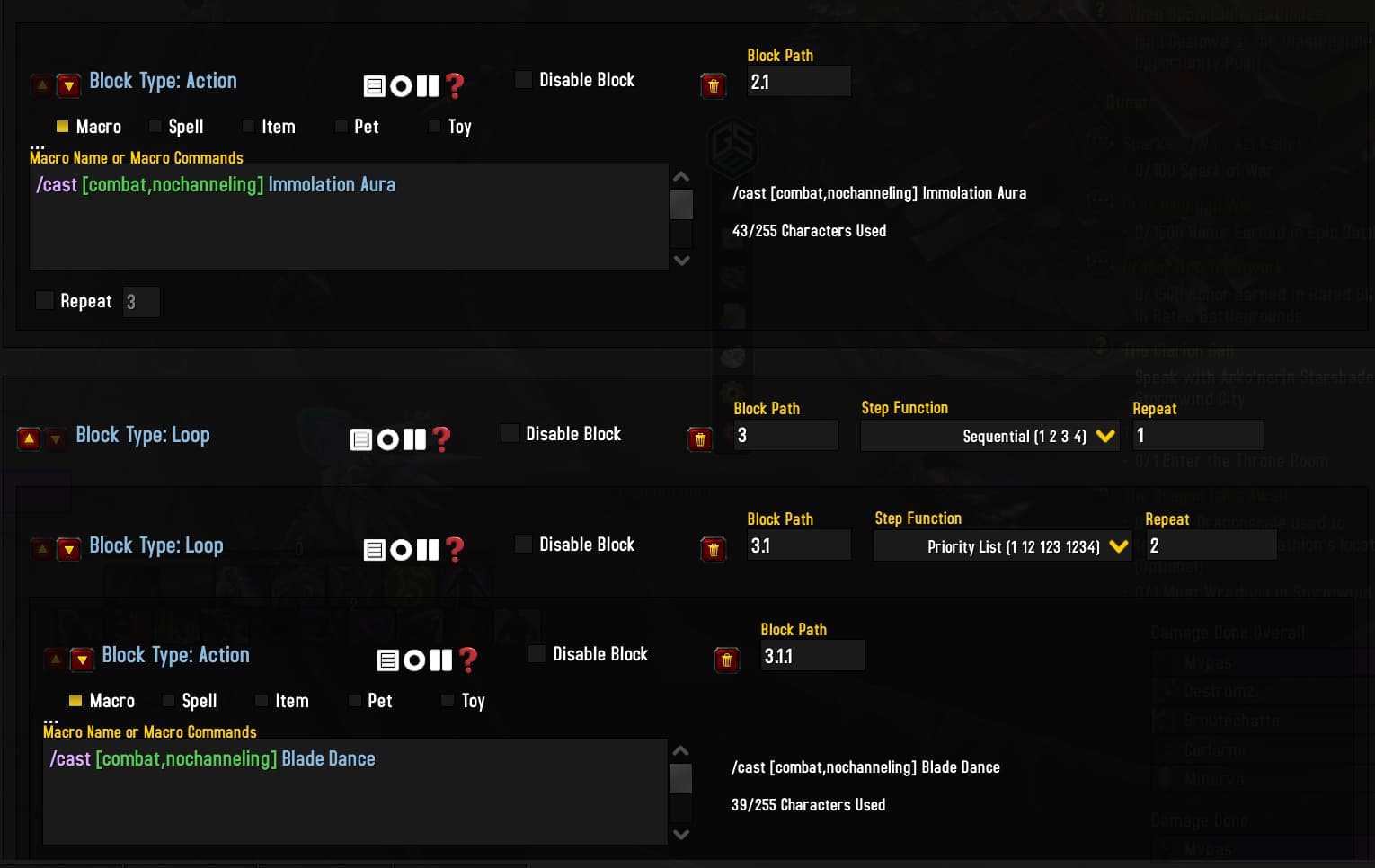
I guess this in the reason.
And the maxiumum Characters used in your nomod sequence is 40/255. Your macro doesnt even have one complicated Command inside. Just every box /cast one skill. I dont see any reasons why you couldnt use the normal modifiers.
Hey @Ves_Minev,
Havoc is probably the simplest spec in the game to sequence.
If you’re evaluating the system based on your impression of AutoSpec: Havoc, you’re not considering the scale of what I do. Specs like Affliction, Balance, and Shadow push the character limits with /castsequence logic, WeakAura sync, and conditional layering — and the structure I use holds up across all of them while keeping installs and setup consistent.
If the sequences aren’t casting anything, it’s almost always because you’re not holding Shift to initiate combat.
That’s intentional. AutoSpec uses Shift as a safety across all specs — it prevents accidental pulls and gives the user full control over when to engage. Until Shift is pressed, no offensive sequence will fire. This is covered in the Controls and FAQ sections.
The [combat] conditional on every line in ..._NOMOD is not an accident.
Locking combat logic behind a Shift key also expands what GSE can do.
It gives me a reliable “pre-combat” window to run stance setups, healing, targeting, or cursor-based abilities safely — all without triggering combat prematurely. That added control effectively doubles the design space available for setup logic and allows much cleaner sequencing. Again, the Shift key doesn’t just start combat — it unlocks safe pre-combat logic and cleanly gates all damage output behind intentional input.
I can only assume you skipped over my earlier explanation — which I took time to write thoughtfully and in good detail for you. You’re either missing, or misunderstanding what looping structures are, what they enable, and how to take advantage of them.
Specific example why this won’t work for Havoc: Ctrl is set to prioritize Eye Beam over Sigils, matching WeakAura prompts. That priority would be lost in the ..._NOMOD loop.
Character Limits
Here’s a real-world example of what a layered, state-aware macro looks like if I were to combine them like you want:
/targetenemy [noharm,nomounted][dead]
// No Combat Logic
/startattack [mod:shift,nocombat]
/cast [mod:shift,nocombat,noflying] Set Stance X
/cast [mod:shift,nocombat,noflying] Stance X Ability
// No Combat Healing
/cast [mod:alt,nocombat] Healing Ability
// Shift Modifier
/cast [combat,nochanneling] Ability
// Ctrl Modifier
/cast [mod:ctrl,@mouseover,harm,nodead] Mouseover Ability
/castsequence [mod:ctrl,combat,nochanneling] reset=combat Start of Combat Ability, null
/cast [mod:ctrl,nocombat,noflying] Ability
// Alt Modifier
/cast [mod:alt,@cursor] Cursor Ability
/castsequence [combat,nochanneling] reset=target Initial DoT, null
// No Modifier
/cast [combat,nochanneling] Filler
This clearly pushes the 255-character limit, and even if it didn’t, the shared-loop conflicts would still be a problem. Independent sequences solve this cleanly and scale across dozens of specs.
With more basic sequences, modifier conditionals might be the way to go, but with the scale of what I’m doing and amount of logic I cram into each AutoSpec build, modifier conditionals are restricting.
If you’re still having issues, I’m happy to help — but I’ll need specific details. I can’t spend the same amount of time I just did on the last two replies trying to re-explain everything from scratch.
hi ! , love your macros I can see you put alot of work into them, I have one problem tho everything works perfectly except essence break is not showing up on the WA , or it is not being used by the macro at all