Oops, thanks for pointing that out, this should be “Player” not “Target”
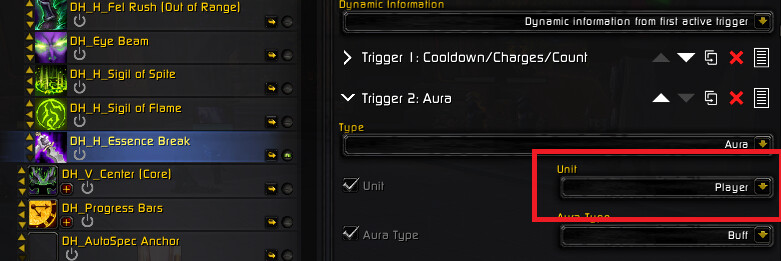
You can simply update the trigger or reimport 
Oops, thanks for pointing that out, this should be “Player” not “Target”
You can simply update the trigger or reimport
heyas
on i see a lot of macros that were downlaoded.
which is the macro i bind?
There are 4 GSE sequences
and a few in game /macros
My best advice for you is to check out the getting started link at the top which is where I laid out how to configure everything to get it all running
Thanks ! , I noticed this also yesterday when fiddling around and its fixed  , also I had to add the macro to cast essence break into the ALT sequence because it was missing there aswell , just a heads up i just deleted the smaller sigil not sigil of flame but the other weaker one in CTRL sequence that macro was combat prio 3 dont remember the name of the spell but i mainly play PVP and we dont use that one at all , and added the macro for essence break into ALT as combat prio 3 and now its all smooth and working
so we have to bind all the macros to separate keys?
Choose a key that you want to use to ‘run’ the sequences (do damage). Bind the ...NOMOD sequence to that key.
Then bind the other sequences, ...SHIFT, ...CTRL, ...ALT to the same key—with the appropriate modifier.
This works like “swapping damage output channels” when you press the mods that are prompted by the WeakAura.
🚀 AutoSpec: Getting Started
hmm ok so i use razor
i sually put the macro on this key
[
which i bind to my mouse button 1/10 keys.
im assuming you are instructing me to bind the modifiers to the [ key on button 1/10 on my mouse.
However,
GSE will not let me bind multiple macros to the same key
Please check out the link — it’s an easy, step-by-step setup guide that shows exactly how to do this. I also included a video walkthrough if you’d rather follow along visually.
If you run into issues binding to your mouse, you can skip that step and just bind to a convenient key like E or 1.
Here’s your binding logic:
Binding   | Sequence
[         = ...nomod
[ + Shift = ...shift
[ + Ctrl  = ...ctrl
[ + Alt   = ...alt
That said, I strongly recommend using Num Pad + instead of [ — some keys like [ are known to cause conflicts with mods at the OS level. I’ve never seen problems with Num Pad +, but I vaguely remember someone having issues with [ a while back.
For Razer, like I use, you need to bind the mousebutton to Num Pad + or [ then going into WoW, GSE and bind to that key
so you are binding 4 separate keys?
Binding 4 sequences to one key using the key itself + Shift Ctrl and Alt mods
Binding   | Sequence
[         = ...nomod
[ + Shift = ...shift
[ + Ctrl  = ...ctrl
[ + Alt   = ...alt
is tha using razor synapse?
ie
i look at razor mouse, button 1
i assign lets say nmpd +
i use gse to bind NOMD to nmpd+
this is where i get confused
how do i now bind nmpd+ and alt. shift, ctrl to one button on the mouse? and or in gse?
Just bind one key in Razer Synapse—Numpad +—to your chosen mouse button. Don’t try to bind Shift, Ctrl, or Alt in Razer Synapse; those modifiers are on your keyboard and will be applied in GSE later.
In GSE, import the four separate sequences—Nood, Shift, Ctrl, and Alt—and bind them like this:
…Nomod sequence to Numpad +
…Shift sequence to Shift + Numpad +
…Ctrl sequence to Ctrl + Numpad +
…Alt sequence to Alt + Numpad +.
In-game, you simply click your mouse button (bound to Numpad +) to fire the ‘default damage’ sequence. When you hold Shift you automatically switch to the Shift sequence, same for the Ctrl and Alt sequences. No extra Razer Synapse binds—just one bind in razer synapse and four GSE bindings.
ah ok ill give it a go ty
i can help you, i use razor.
I bind the no mod to 8
the other to shift 8, ctrl 8 and alt 8.
set the ms of 8 to want u want, (test and see)
then i just hold 8, when his WA tells me to press shift, i press shift (while still holding 8)
thank you very much have to type 20 characters…
THANK YOU! I just set this stuff up yesterday and im more than satisfied man, doing 3,2 Million DPS ST and about 6 - 10 Million MT at 649 because of you! Thanks again for the work ur doing, it’s so good that I had to share with friends.
Happy to hear it, thanks mate
This sequence is art of god himself. I love it. Been rerolling into a DH recently and it’s amazing, one question though since frost dk is getting popular this patch, are you planning to make something for him? Honestly everything i tried does not match your auto spec.
Thats me, god himself.  jk
jk
Happy to hear it’s working out for you. When the next season drops, I’m planning to use WoW trend data to help decide which specs to prioritize. That way, I can make sure my time has the biggest impact across the community.
For some reason with the WA for this one, the word “alt” is constantly up, and never goes away. No idea why it started doing this, or how to remove it. Tried removing and re-adding the WA, same issue.
I eventually reverted to an older WA I had on an alt account instead, and it works fine.