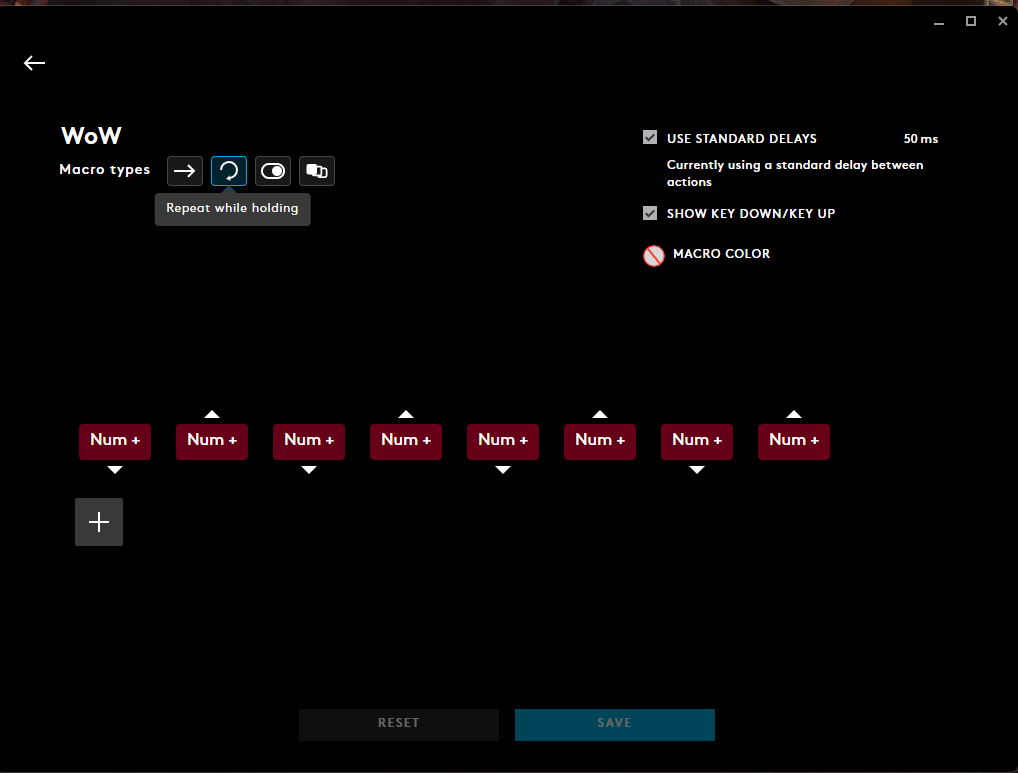
I did that and it got worse to the point of fully not working. I’ve deleted all the imports and I’m going to try it again to see if that corrects anything. I also verified that the NUM+ isn’t bound to anything as well.
–it’s enough to make angels weep. It’s not reacting at all like your video. I think I’ll try something besides the NUM + and report back.
If you suspect the issue is tied to your mouse binding, you can try using the same setup logic but bind the macro to a keyboard key like E or 1 instead. The modifier system will still function exactly the same—you’ll just need to hold that key down for the duration of the fight.
Are you seeing the sequences being triggered when using the troubleshooting WeakAura?
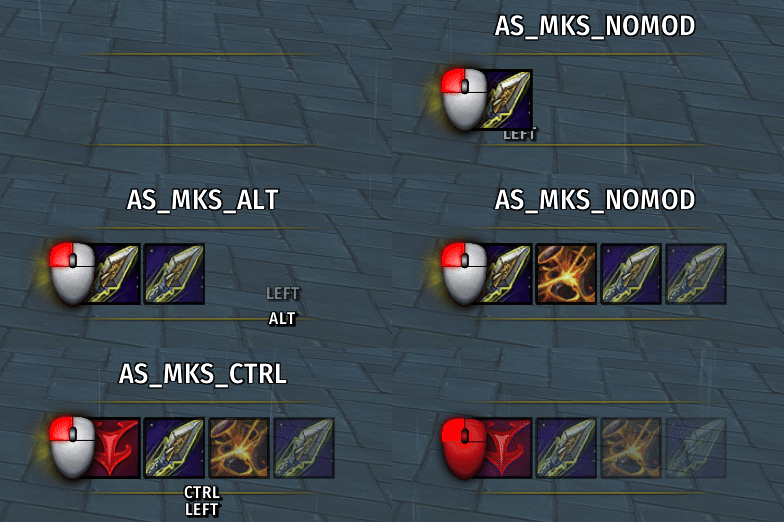
In this clip, I’m holding my mouse button while toggling Shift, Ctrl, and Alt modifiers.
Got it. Just keep in mind—if the sequences aren’t showing up in the Troubleshooter I linked, then the issue isn’t with the sequences. It’s a configuration problem on your end where the sequences aren’t being called upon at all.
That said, I’ll go ahead and proactively update the WeakAura and GSE sequences with my latest version. There are a few minor tweaks I’ve made that might help streamline things.
It’s got to be something on my end, but I don’t know what. I can press the mouse button and it will keep a continual key down as proven on notepad, but not while in-game. The mouse button has to be spammed. It’s also not doing anything but calling for the CTRL key to be pressed. A tad frustrating as I’m not sure why it’s not doing the sequences as it should and the button being depressed full time isn’t registering as being held down.
I also changed the NUM+ key to another key with the same result.
That’s your smoking gun right there. Something—likely at the OS or background app level or mouse software level—is intercepting or overriding your Shift and Alt modifier inputs when combined with your activation key in-game. I wish I could tell you exactly what it is, but I don’t know. It’s odd that Ctrl works while the other two don’t.
If you figure it out, definitely let me know—would be great to have an answer for others who run into this.
As a workaround, you could always bind each sequence to a separate key (like 1, 2, 3, 4). It’s not ideal and might create complications in and out of combat or when typing in chat, depending on how you set it up. I haven’t done it myself—just offering a potential fallback.
And don’t forget: you can modify the WeakAura text field however you want. If the “Shift,” “Ctrl,” or “Alt” labels aren’t working for you visually, you can rename them to anything that applies to your setup.
The first thing I’m doing is uninstalling the G-Hub because everything is screwed up now. I hate mouse software with a passion. It literally remapped so many things in WoW. I’ve had to reset everything to default.
Let me know if you figure it out. I’m the one he was talking about that’s having an identical problem. Also using G Hub. I’ve tried running as admin and all sorts of other stuff.
I’ve got nothing so far. I even uninstalled GHub with no improvement. Wonder if it isn’t something to do with the mouse? The other sequences I use work fine, including some I’ve built. It has something to do with holding down the button for some reason.
Yeah, I really have no idea. I can hold it down and it will continuously input into the chat window, but not run through the sequence. Was thinking about uninstalling G Hub and using the mouse clicker program to see if that worked. Not sure if it’s a logitech issue or what.
I would start with a delete and reimport of the weak aura. If any of the settings were changed it could cause it not to load properly.
While I was testing marksman I got into some of the trigger logic and made a big update to how multi shot is used.
-- This trigger activates Multi-Shot when:
-- - Multi-Shot is usable
-- - 3 or more enemies are detected
-- - Trick Shots is not active (Buff Not Found)
-- - Precise Shots is active
-- - Either Spotter’s Mark or Moving Target is not active (both are required for the burst window)

function(t)
    return
        t[1]              -- Multi-Shot usable
        and t[2]          -- 3+ enemies detected
        and t[3]          -- Trick Shots not active
        and t[4]          -- Precise Shots active
        and (t[5] or t[6]) -- Either Spotter’s Mark or Moving Target not active
end
I set it up like this, but not sure if this looks correct in terms of delay speed. It definitely works compared to assigning an actual key to the button tho!
Yes, there is—but keep in mind that many of the features in the WeakAura aren’t Marksman-specific. For example, the “Priority HUD” is class wide defensives and the “Cursor HUD” has several class wide movement abilities. You can pick and choose what to enable or disable.
To do that, select the specific elements of the WeakAura (or the entire group), go to the Load tab, and set it to load only under a specific specialization. Choose Marksman from the dropdown, and you’re good to go.