Hi everyone, I put together a little AHK tool basically an overlay for ST and AE macros.
As soon as you launch the script, it’ll ask you for your hotkeys:
one for single-target and one for area-of-effect.
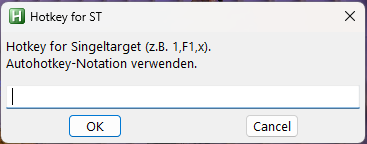
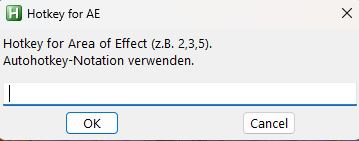
Once the script is running and the hotkeys are set, you can open the overlays with F7 (ST) and F8 (AE).
F7/F8
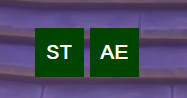
You can drag them wherever you want. Their positions are saved and restored the next time you start the script.
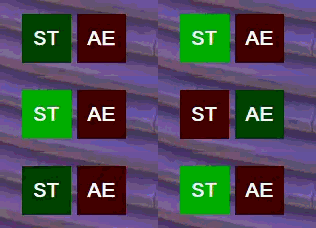
If ST is active, the ST overlay turns green and AE turns red and the other way around as well.
Have fun with it! 
#SingleInstance Force
#NoEnv
#Persistent
DetectHiddenWindows, On  ; auch versteckte GUIs für WinGetPos sichtbar machen

; ============================
; Config-Datei für Positionen
; ============================
configFile := A_ScriptDir "\overlay_positions.ini"

; Standard-Positionen (Fallback)
defaultO1X := 300
defaultO1Y := 300
defaultO2X := 380
defaultO2Y := 300

; Gespeicherte Positionen laden (oder Fallback)
IniRead, O1X, %configFile%, Overlay1, X, %defaultO1X%
IniRead, O1Y, %configFile%, Overlay1, Y, %defaultO1Y%
IniRead, O2X, %configFile%, Overlay2, X, %defaultO2X%
IniRead, O2Y, %configFile%, Overlay2, Y, %defaultO2Y%

; Falls Ini nicht existiert oder leer/ERROR -> Defaults erzwingen
if (O1X = "" || O1X = "ERROR")
    O1X := defaultO1X
if (O1Y = "" || O1Y = "ERROR")
    O1Y := defaultO1Y
if (O2X = "" || O2X = "ERROR")
    O2X := defaultO2X
if (O2Y = "" || O2Y = "ERROR")
    O2Y := defaultO2Y

; OnExit-Handler registrieren
OnExit, SavePositions

; ============================
; Sichtbarkeit
; ============================
vis1 := 0
vis2 := 0

; Blink-States
blinkState1 := 0
blinkState2 := 0
blinkCount1 := 0
blinkCount2 := 0

; Farben
activeBase   := "004400"
activeBlink  := "00AA00"
inactiveBase := "440000"
inactiveBlink:= "AA0000"

fixedW := 49
fixedH := 49

; ============================
; Hotkeys abfragen
; ============================
AskHotkeys:
InputBox, ST_HK, Hotkey for ST, Hotkey for Singeltarget (z.B. 1`,F1`,x).`nAutohotkey-Notation, , 380, 150
if (ErrorLevel || ST_HK = "")
{
    ST_HK := "vkBB"
}

InputBox, AE_HK, Hotkey for AE,  Hotkey for Area of Effect (z.B. 2`,3`,5).`nAutohotkey-Notation, , 380, 150
if (ErrorLevel || AE_HK = "")
{
    AE_HK := "vkDE"
}

; dynamische Hotkeys
Hotkey, ~%ST_HK%, ST_HotkeyHandler, On
Hotkey, ~%AE_HK%, AE_HotkeyHandler, On
goto, InitGui

; ============================
; GUI-Setup
; ============================
InitGui:

; OVERLAY 1 (ST)
Gui, Overlay1:Destroy
Gui, Overlay1:+AlwaysOnTop +ToolWindow -Caption
Gui, Overlay1:+HwndOverlay1Hwnd
Gui, Overlay1:Color, %activeBase%
Gui, Overlay1:Margin, 0,0
Gui, Overlay1:Font, s14 Bold

Gui, Overlay1:Add, Text, vO1Label gOverlay1_Drag x0 y0 w%fixedW% h%fixedH% cWhite BackgroundTrans Center +0x200, ST
Gui, Overlay1:Show, x%O1X% y%O1Y% w%fixedW% h%fixedH% Hide

; OVERLAY 2 (AE)
Gui, Overlay2:Destroy
Gui, Overlay2:+AlwaysOnTop +ToolWindow -Caption
Gui, Overlay2:+HwndOverlay2Hwnd
Gui, Overlay2:Color, %activeBase%
Gui, Overlay2:Margin, 0,0
Gui, Overlay2:Font, s14 Bold

Gui, Overlay2:Add, Text, vO2Label gOverlay2_Drag x0 y0 w%fixedW% h%fixedH% cWhite BackgroundTrans Center +0x200, AE
Gui, Overlay2:Show, x%O2X% y%O2Y% w%fixedW% h%fixedH% Hide

; Timer
SetTimer, BlinkTick, 60
SetTimer, TrackPos, 500   ; alle 500 ms Positionen mitschreiben
return

; ============================
; Blink-Logik
; ============================
BlinkTick:
    if (vis1 && blinkCount1 > 0) {
        blinkState1 := !blinkState1
        Gui, Overlay1:Color, % (blinkState1 ? activeBlink : activeBase)
        blinkCount1--
    }

    if (vis2 && blinkCount2 > 0) {
        blinkState2 := !blinkState2
        Gui, Overlay2:Color, % (blinkState2 ? activeBlink : activeBase)
        blinkCount2--
    }
return

; ============================
; Positionen regelmäßig tracken
; ============================
TrackPos:
    if (Overlay1Hwnd) {
        WinGetPos, tX, tY,,, ahk_id %Overlay1Hwnd%
        if (tX != "") {
            O1X := tX
            O1Y := tY
        }
    }
    if (Overlay2Hwnd) {
        WinGetPos, tX2, tY2,,, ahk_id %Overlay2Hwnd%
        if (tX2 != "") {
            O2X := tX2
            O2Y := tY2
        }
    }
return

; ============================
; Drag-Handler
; ============================
Overlay1_Drag:
    PostMessage, 0xA1, 2,,, A
return

Overlay2_Drag:
    PostMessage, 0xA1, 2,,, A
return

; ============================
; F7 / F8: anzeigen / verstecken
; ============================
F7::
    vis1 := !vis1
    if (vis1)
        Gui, Overlay1:Show, NoActivate
    else
        Gui, Overlay1:Hide
return

F8::
    vis2 := !vis2
    if (vis2)
        Gui, Overlay2:Show, NoActivate
    else
        Gui, Overlay2:Hide
return

; ============================
; Dynamische Hotkey-Handler
; ============================
ST_HotkeyHandler:
    if (vis1) {
        Gui, Overlay1:Color, %activeBase%
        blinkCount1 := 8
    }
    if (vis2) {
        Gui, Overlay2:Color, %inactiveBase%
        blinkCount2 := 0
    }
return

AE_HotkeyHandler:
    if (vis2) {
        Gui, Overlay2:Color, %activeBase%
        blinkCount2 := 8
    }
    if (vis1) {
        Gui, Overlay1:Color, %inactiveBase%
        blinkCount1 := 0
    }
return

; ============================
; Positionen speichern beim Beenden
; ============================
SavePositions:
    ; nur schreiben, wenn wirklich Werte da sind
    if (O1X != "" && O1Y != "") {
        IniWrite, %O1X%, %configFile%, Overlay1, X
        IniWrite, %O1Y%, %configFile%, Overlay1, Y
    }
    if (O2X != "" && O2Y != "") {
        IniWrite, %O2X%, %configFile%, Overlay2, X
        IniWrite, %O2Y%, %configFile%, Overlay2, Y
    }
ExitApp
return