Hi
I’ve just come back to WoW and have GSE Working. My issue is when I login the Sequences don’t work and I have to reimport them to get them firing. Is there a setting I have to turn on. I have tried binding a sequence reset to a key but that doesn’t seem to work, any thoughts?
exact same issue since today Oo
I’m having a similar issue, and the macro I’m using seems to get flagged and saved with ‘Disable Sequence’ between loading screens and cutscenes. I have to turn that off almost every single time a I get ‘moved’ to a new area, not sure if it’s somehow my fault but I have to keep an eye on it.
Nobody can help, unless you give a lot more details. other than @Bveryofa, most of this is equivelant to going to a repair shop and saying “car broke” and walking off. lol
like what do u need?
thats helps a little. could you please say what “Sequence(s)” you are using. makes it easier to see if help can be given.
im having issues with this sequence: Orbalisk’s - Justicar! Mythic+ for Mythic+ v.4.6 (Updated 01/31/26)
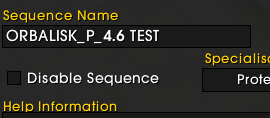
I figured it out. There is a new check box here for some reason I can’t fathom, that automatically checked during my last update. Standby for 1.7 where this is fixed.
1 Like
Tim has expressed its purpose in his update with pre-patch. lol
I probably missed it. I’ll check and see what he’s up to.
Edit: I found it:
“So if you have a bunch of sequences and dont want to delete them but also dont plan on using them, disabling them improves load times as its not setting those sequences”
I can actually benefit from doing that on older sequences because I tend to have …. about a hundred versions.
1 Like
Follow up, once I identified the 'Disable Sequence’ toggle and disabled it and saved the macro, I did not have that issue anymore, I must have been saving one of the specific sequences instead of the entire imported macro. Currently using the WenLo - Way of the Ox Brewmaster, aside from user error I have had zero issues with it so far.
Thanks Orbalisk this was the problem.
1 Like