If you like my macros, and want to provide me with some financial incentive to keep this and other macros updated, you can do so here: Paypal
update 2/2/26: Here’s my update for patch 12.0.
By having spells in the wow macro, before or after the /click command to trigger GSE, it is possible to get gse to function similar to how it used to (albeit with some added limitations within GSE).
Important:
go to GSE options - TroubleShooting - turn off ActionButtonUseKeyDown, otherwise gse macro won’t fire off using this macro set.
The following WoW macros use the “/click GSE_NAME” command to activate the gse sequence of the same name as shown below. Note: this method only works because I use spell/item blocks inside of gse but not macro blocks, which would break this method if attempted.
SCG_WIW
copy the following macro, paste it in game as a new macro, and drag the icon to the cast bar to be spammed there.
Hey, the channeling skills keep getting canceled/clipped through. Can you do something about it so the channeling skills like fists of fury don’t get canceled if you press the button again?
If you changed around the WoW macro part to fit what you want to do, make sure the [nochanneling] command is present, as that is what will keep channeled spells from getting interrupted.
edit, I decided to add the nochanneling command to 2 of the modifiers to make them easier to use without causing that to interrupt a channeled spell.
You can move around any passive talents you want without causing any issues… It’s only when you add or remove an active skill in the talent tree that you may want to make an adjustment within gse to make sure everything there matches what you know.
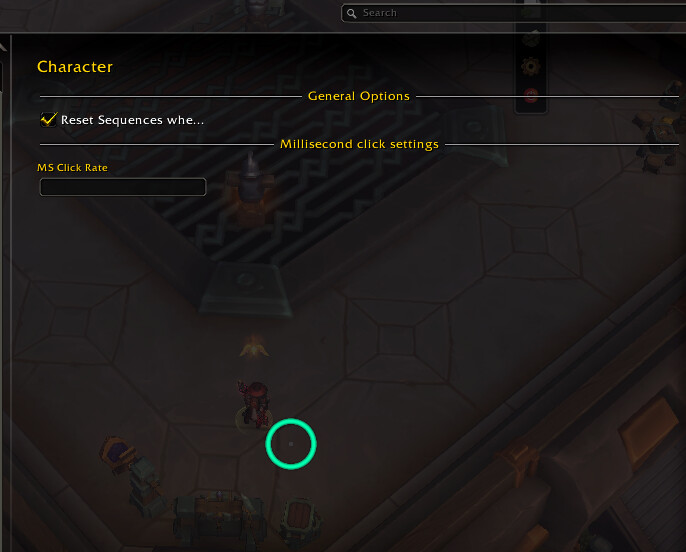
@Thesairen is it normal that it keeps saying “item not ready yet?” when I keep pressing the key of the rotation? Also do we put anything here where it says “MS Click Rate?”
monk just stands there and does nothing when I don’t have it active
[Storm, Earth, and Fire][Invoke Xuen, the White Tiger][Celestial Conduit][Strike of the Windlord]…