every macro that I have saved since the pre patch came out is having problems with keybinds. they work the first session I install them, but the second day they dont register at all; which has left me high and dry in bgs a couple of times. the only* macro that I have that is not having this issue is one I saved in 11.2, my personal bear macro. it doesnt glitch and has never had this issue. it leads me to think something changed in the way keybindings register.
I have a meeting in a few minutes but I’ll try to give what feedback I can on this thread, albeit a little later.
I think i have the same problem, and i think i identified the problem, maybe ? Cause i had to delete the addon and all macros downloaded on curse (elfyau ones) yesterday, today i reinstall them, keybind 2 sequence (ST and AOE) then do 1 fight and everything works perfectly. Then i want to change something on edit mode (option/Edit mode) and soon i save my change on the edit mode the keybind is not working anymore. I tried to desactivate all addon and only let gse ON and same, not working anymore. I dont know what to do. The only addon related to the edit mode i have is Editmode Expanded.
Edit: just want to add that i use GSE for at least a year now, and never had any keybinds problems before the prepatch.
Edit 2: oh and more strange, when i go to the edit mode and try to set up a keybind from there, and try to overwrite the GSE keybind i had selected, the game is telling me that if i do that i will overwrite the key attributed to GSE
I closed the game i logged back again, still was not working, so i deleted the keybind and when i tried to set up the same keybind again, but this time i didnt choose any “talent build and let the option on “all talent builds” and now it’s working Oo
edit: did a /reload and again, not working anymore .. well im gonna wait an update because its a little bit frustrating and i dont know what to do anymore.
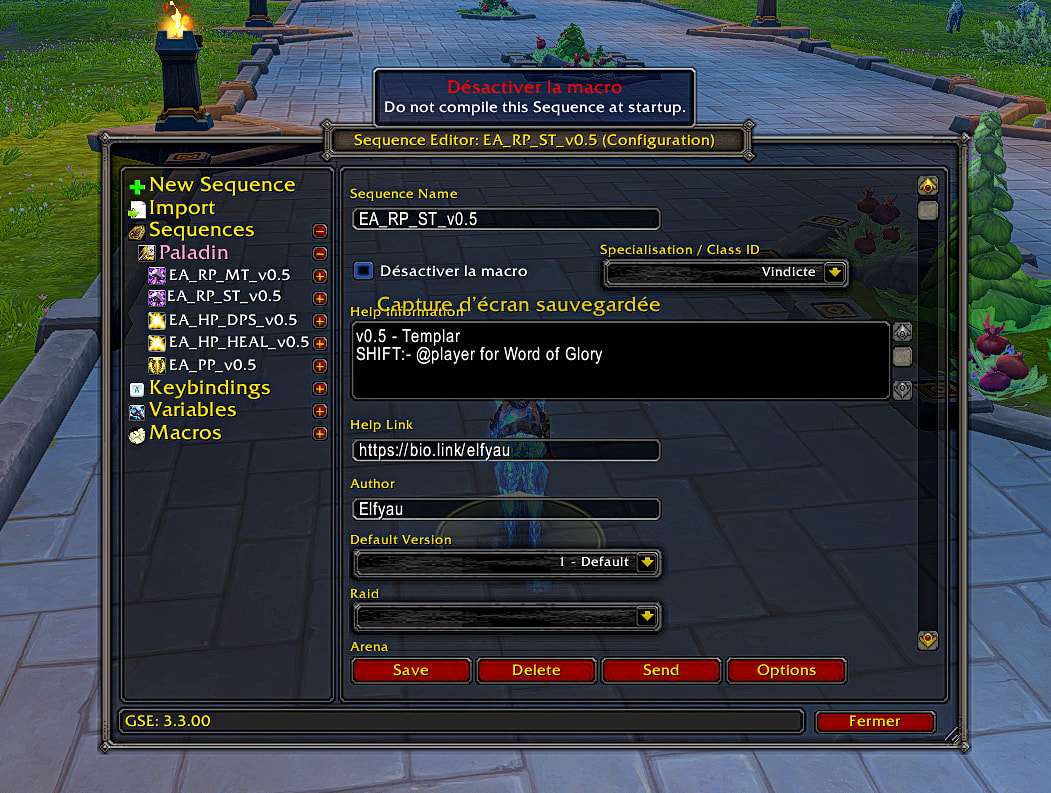
Final edit lol: ok i checked the sequence of the Elfyau macro and saw this
The little checkbox “desactivate macro” (do not compile this sequence on startup) was checked, i unchecked and now its working it seems, even after a /reload, even when i quit and come back to the game.
So i think, in my case the sequence and this checkbow was at fault, not GSE itself. I hope i will help you Dice, and if it is not that, hope you’ll find a solution to your problem
So if it helps track down the problem, every macro I have had this issue with, was one that I had custom edited the entries … I did check for the “disable sequence” button and it is off. still nothing on the toon that I had issues with this afternoon, tho I didnt check the other two toons I had issues with yesterday.
Following is from Tim: The new ones all start with !GSE3!. Old sequences that dont have this cant be imported at all. Old TWW sequences in the new format will import disabled and need to be enabled. With spell changes old sequences may do random things so may need to be edited first.
ok, I did a fresh import and reinstall of the macros from the two toons that were culprits. it seems to be working now. I also rebooted my computer and double checked that … still working. idgi, but Im gonna roll with it. I havent tried editing the macros I just installed yet tho, so a bugbear could be out there waiting.